
10 Best Browser Extensions for QA Engineers in 2026

Every QA engineer has a favorite browser extension.
Some make debugging easier. Others speed up API inspection, automate repetitive tasks, or uncover UI issues before they reach production. In modern software testing, especially across web and mobile applications, browser extensions have become essential software testing tools that give software testers quick access to insights directly inside the browser window.
The right extensions won’t replace your testing strategy, but they can significantly improve test creation, test management, and even complement bug tracking tools by helping you identify issues faster. They also help reduce flaky tests, improve test coverage, and uncover coverage gaps that traditional unit testing or functional testing might miss.
In this guide, we’ll explore the best chrome extensions and must have chrome extensions for QA engineers, covering UI validation, API testing, debugging, accessibility, performance, and AI-assisted workflows.
1. KushoAI Browser Extension
Best for: AI-powered API test generation and workflow testing
Modern applications rely heavily on APIs, especially in systems involving payment processors, authentication, and complex workflows. For teams evaluating browser extensions for qa, creating and maintaining API tests manually can be time-consuming and error-prone. In this guide, we’ll explore how the extension supports API testing, workflow validation, UI testing, and cross browser validation for web applications.
The KushoAI Browser Extension is one of the emerging software testing tools designed to simplify test creation and improve test coverage. It fits alongside ai testing tools and ai test automation tools that use generative ai and natural language to speed up broader QA work.
Instead of manually writing tests, the extension captures API interactions and documentation directly from the browser. It uses AI to generate test cases, validate test values, and simulate problematic values such as edge cases or unexpected inputs. The right extensions won’t replace your testing strategy, but they do support the broader testing process, complement automated tests, and reduce test maintenance across a growing test suite. It also helps validate workflows across multiple endpoints using project specific data.
Key features
- Capture API documentation and interactions
- Automatically generate API tests and test steps
- Validate workflows across multiple services
- Improve test coverage and reduce coverage gaps
- Handle evolving APIs with adaptive testing
- Support validation of json files and structured responses
Best for teams that: want to automate API testing and reduce manual effort in test management. KushoAI is one of the ai testing tools and ai test automation tools used in web applications to create and maintain automated tests, where test maintenance often becomes a bottleneck in code release processes. In fact, 55% of teams using open-source frameworks spend over 20 hours weekly on test maintenance. It uses AI to generate test cases, and generative ai can turn natural language inputs or captured browser behavior into tests. With project-specific data, it can validate realistic scenarios. AI can also update tests for minor changes in applications, which helps reduce test maintenance for larger test suite setups.
2. Postman Interceptor
Best for: Capturing API requests directly from your browser
Postman Interceptor is a must-have extension for API testing workflows.
It captures cookies and network requests directly from your browser window, making it easier to debug authenticated sessions and validate API behavior during functional testing.
Key features
- Capture HTTP requests
- Sync cookies
- Debug authentication flows
- Improve API test data validation
3. JSONVue
Best for: Reading JSON responses
QA engineers frequently work with APIs that return json files.
JSONVue formats responses into readable structures, making it easier to validate field value testing, inspect nested objects, and verify test results quickly.
Key features
- Pretty-print JSON
- Collapsible structures
- Syntax highlighting
- Faster validation of API responses
4. ModHeader
Best for: Testing authentication and request headers
ModHeader allows QA engineers to modify request headers without backend changes.
This is especially useful when testing authentication, simulating different environments, or validating problematic values in headers.
Key features
- Modify headers instantly
- Test authentication flows
- Simulate different user agents
- Validate edge cases in API requests
5. Wappalyzer
Best for: Understanding application architecture
Wappalyzer helps QA engineers understand the technologies behind a web page.
Knowing the stack helps testers anticipate issues related to frameworks, dependencies, or even potential javascript exploits like basic xss vulnerabilities.
Key features
- Detect frontend and backend technologies
- Identify analytics and CMS tools
- Improve testing strategy planning
6. Axe DevTools
Best for: Accessibility testing
Accessibility is a critical part of modern software testing.
Axe DevTools helps identify accessibility issues such as missing ARIA labels, poor contrast, and navigation problems across web and mobile platforms.
Key features
- Accessibility audits
- WCAG compliance checks
- Identify usability issues
- Improve inclusive design
7. Lighthouse
Best for: Performance and quality audits
Lighthouse is a powerful built-in Chrome tool that evaluates performance, accessibility, and best practices. Page Load Time is another extension used to measure web page load times for performance checks.
It helps identify display issues, performance bottlenecks, and layout inconsistencies across different screen resolutions and other screen resolutions, which supports cross browser checks and regression testing workflows.
Key features
- Performance audits
- Accessibility checks
- SEO insights
- Progressive Web App validation
8. EditThisCookie
Best for: Session and authentication testing
EditThisCookie allows QA engineers to manipulate cookies for testing login flows and session handling.
It’s useful for validating authentication scenarios and reproducing bugs related to session management.
Key features
- Create and edit cookies
- Import/export sessions
- Simulate user states
- Validate authentication flows
9. ColorZilla
Best for: UI verification
ColorZilla helps QA engineers with ui testing by validating UI elements such as colors, gradients, and spacing.
It’s especially useful when verifying pixel perfect product requirements, ensuring intended design pixel accuracy, and checking element spacing across different website layouts.
Tools like ColorPick Eyedropper also let you select colors and get hex and RGB values for quick design checks.
PerfectPixel overlays images for pixel-perfect design validation.
Key features
- Color picker
- Gradient inspector
- CSS value extraction
- UI validation support
10. LocatorJS
Best for: Debugging frontend components
LocatorJS helps QA engineers quickly locate elements on a page and map them to source code.
It simplifies debugging by identifying element ids, css selectors, and component origins.
Key features
- Jump from UI to code
- Identify editable elements
- Inspect DOM structure
- Improve debugging efficiency
Bonus: Page Ruler Redux
Best for: Measuring UI elements precisely
Page Ruler Redux allows QA engineers to measure dimensions directly on a web page.
It’s useful for validating layouts across different screen resolutions, ensuring consistency in website layouts, and identifying UI inconsistencies.
Bonus: Window Resizer
Best for: Testing responsive layouts
Window Resizer is one of the must have chrome extensions for testing responsiveness.
It allows QA engineers to quickly switch between different screen resolutions and simulate various devices.
Key features
- Resize browser window instantly
- Test across multiple resolutions
- Validate responsive design
- Identify layout issues
Which browser extension should QA engineers install first?
It depends on your testing focus.
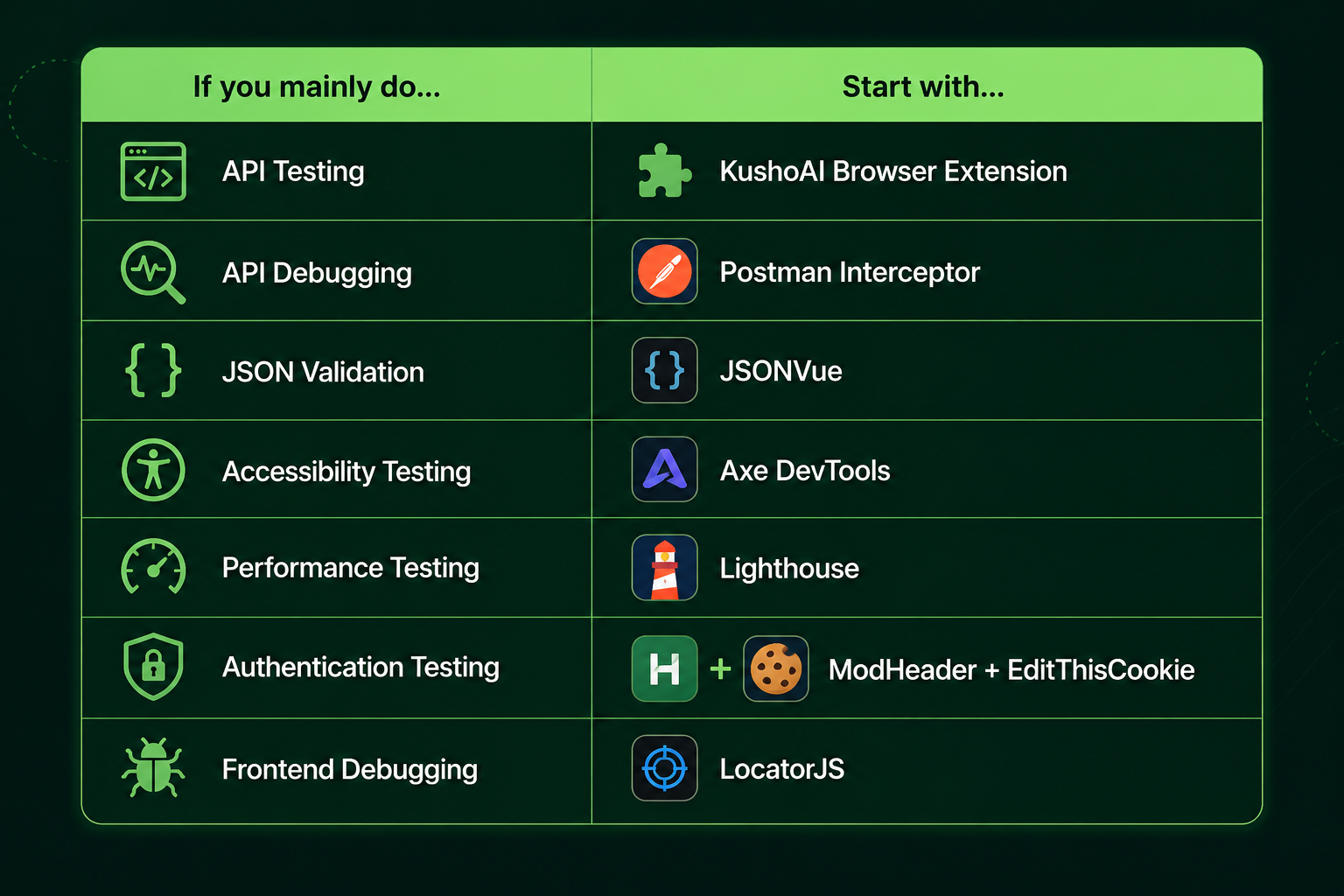
No single extension solves every testing challenge.
The most effective QA engineers combine multiple software testing tools to improve test coverage, reduce flaky tests, and ensure reliable test results.
Why browser extensions are essential for modern QA
Browser extensions provide quick access to tools that help QA engineers validate applications faster.
They support:
- Test creation and execution
- Improved test management
- Faster debugging and validation
- Better handling of test data
- Identification of coverage gaps
- Validation of user stories and workflows
They also complement other tools like CI/CD pipelines, automation frameworks, and bug tracking tools.
The role of AI and automation in testing
Modern QA workflows are evolving with automation and AI.
Browser extensions provide quick access to tools that help QA engineers validate applications faster, and they can also support exploratory testing directly in the browser as part of the broader testing process.
Extensions now support:
- Automated test creation
- Intelligent validation of test values
- Detection of problematic values
- Reduced reliance on manual human oversight
- Improved self healing test systems
- Faster exploratory testing for engineering teams
Loom records browser activity for faster bug sharing through video.
Jam.dev captures console logs and environment data for bug reporting.
AI-powered ai testing tools strengthen test automation, reduce repetitive work, simplify test maintenance, improve accuracy, and ensure consistent validation across web and mobile applications.
Final thoughts
The best browser extensions are part of a modern testing process that increasingly includes AI testing tools and test automation.
Today, 81% of development teams use AI in testing workflows.
They improve software quality.
Whether you're validating UI elements, testing APIs, checking accessibility, or debugging issues in web applications, the right extensions help QA engineers run tests efficiently and deliver a pixel perfect product.
By combining tools for inspection, automation, and validation, QA teams can improve test coverage, reduce errors, and ensure reliable performance across mobile applications and web platforms. Engineering teams tend to use AI selectively, especially to reduce test maintenance, while keeping human oversight important. Tests that took 8-12 hours to write now run in minutes.
Frequently Asked Questions
What are the best chrome extensions for QA engineers?
Some of the best chrome extensions include KushoAI Browser Extension, Postman Interceptor, JSONVue, ModHeader, Axe DevTools, Lighthouse, Wappalyzer, EditThisCookie, ColorZilla, LocatorJS, Page Ruler Redux, and Window Resizer.
Why are browser extensions important for software testing?
Browser extensions provide quick access to debugging tools, improve test creation, enhance test management, and help QA engineers validate applications more efficiently.
Can browser extensions replace other testing tools?
No. Browser extensions complement other tools such as automation frameworks, CI/CD pipelines, and bug tracking tools, but they do not replace them.
How do browser extensions improve test coverage?
They help identify coverage gaps, validate test data, simulate edge cases, and ensure consistent testing across different environments, screen resolutions, and cross browser setups. They also support regression testing and complement other tools used for test automation, CI/CD pipelines, and bug tracking tools, but do not replace them.
Are browser extensions useful for mobile applications?
Yes. Many extensions help test responsive designs, simulate devices, and validate behavior across web and mobile applications, ensuring consistent user experiences.
Member discussion